 Game Cast
The whole
ballpark
Scoring, video, sound and the record, in one app that a parent volunteer can run from the bleachers. Below is all of it, in pictures of the app itself, with the paid parts marked — and then what is being built this week, marked amber until it runs.
Every picture below is a real screen of Game Cast, captured from a demo game between two invented teams. No child on this page is a real child.
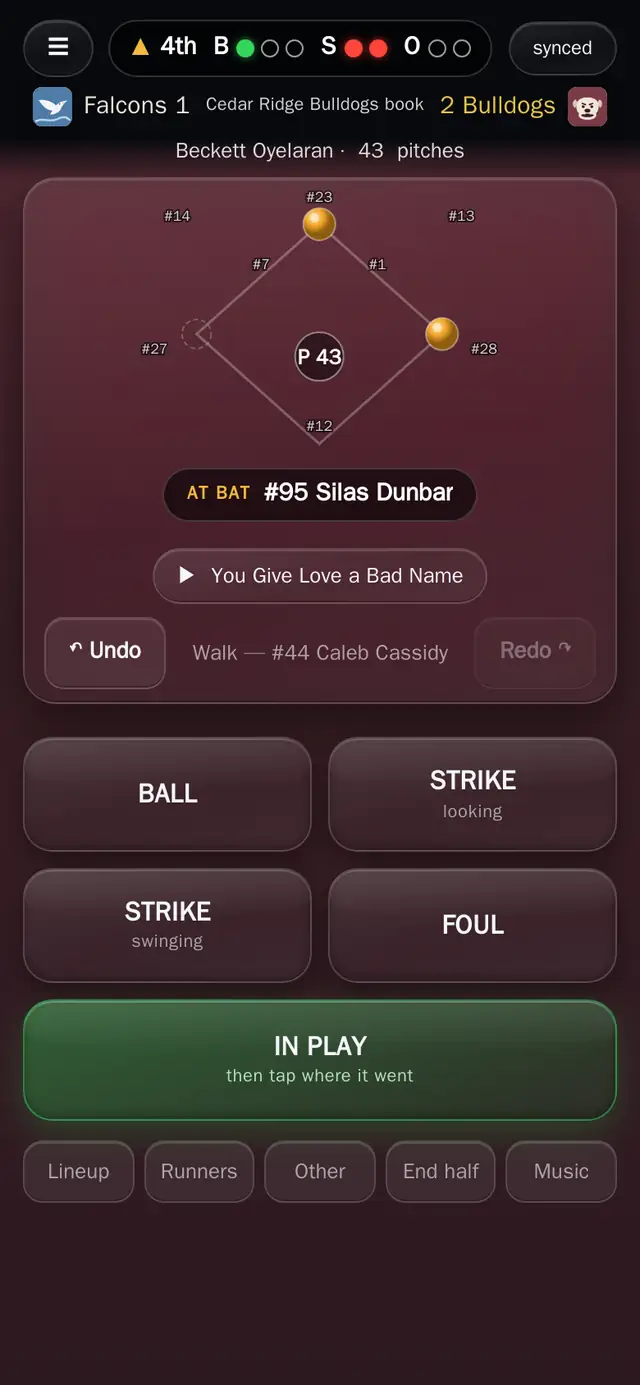
The book in the fourth: two on, the count on the bar, and the pitch count following the pitcher.
A scorebook that knows the rules
Tap balls, strikes and where the ball went. Game Cast works out the rest: runners advance, the count resets, outs accumulate, the pitch count follows the pitcher rather than the inning.
- Pitch by pitch, with the ball's flight and landing spot recorded
- Substitutions, courtesy runners, defensive changes and ejections
- Amend a play after the fact; the box score and the stats follow
- Pitch limits with colour warnings, and an alert to the staff before a pitcher runs out
- Suspend and resume for rain, lightning, darkness or a field problem
- Works with no signal; taps queue on the phone and push when the bars return
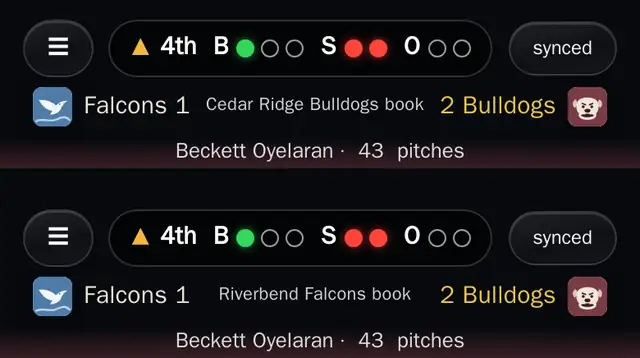
One game, two books. Same inning, same score, each dugout writing its own.
Both dugouts keep score, on one game
Each team gets its own book on the same game. That is not a redundancy feature, it is how the disagreements get settled: two independent records of the same half inning, merged by the app.
- Each book writes its own lineup; neither can write the other's
- Duplicate events collapse instead of double-counting
- Fielding credit comes only from the team that was in the field
- A link is the handoff — the other dugout needs no account to score
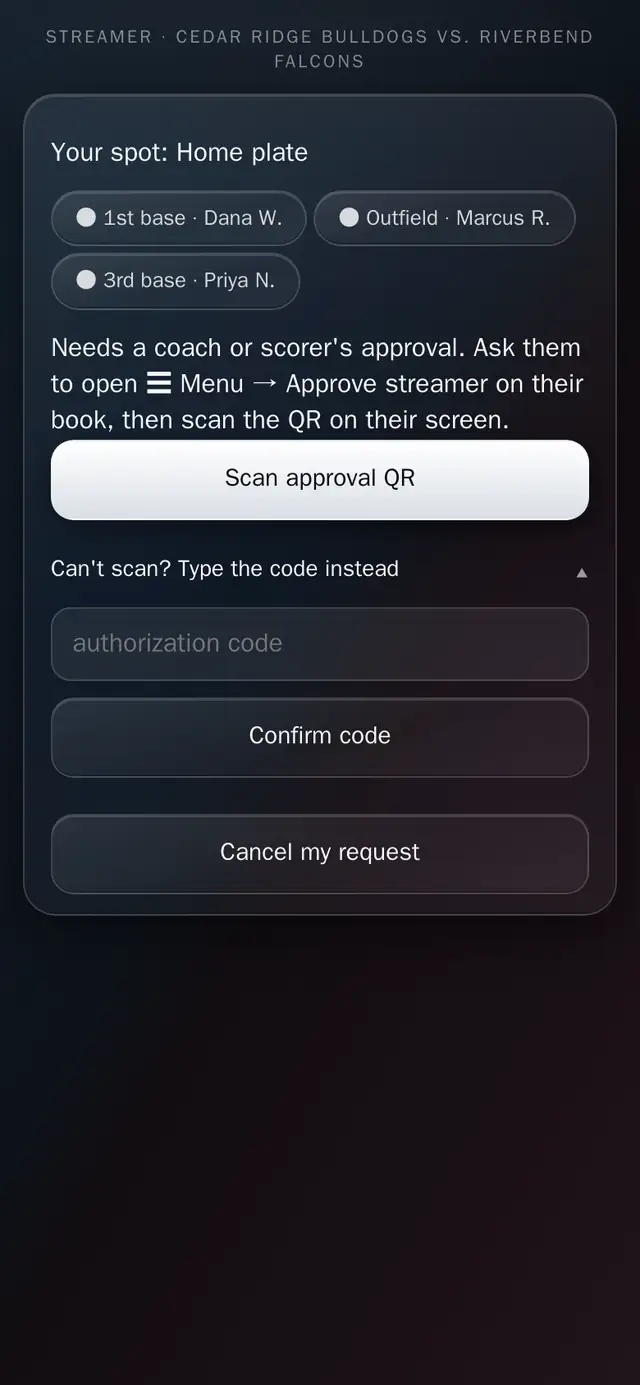
A spot claimed and the coach still to approve it. Three phones are already on this game.
The phone in your pocket is the broadcast
A volunteer asks for a camera spot, a coach approves it in person with a QR code, and the phone starts a real stream: 720p, low latency, recorded, with clips cut automatically.
- One button. The camera opens itself, landscape is enforced, the screen stays awake
- Up to four labelled cameras on one game: home plate, first, third, outfield, dugout
- Fans pick a camera, or watch every camera at once in a grid that stays in step
- Replays kept 30 days on the free tier, the whole season on Plus
- A 30-second clip of every play, cut automatically and attached to the players in it
- Links are short-lived and signed; a copied video URL dies
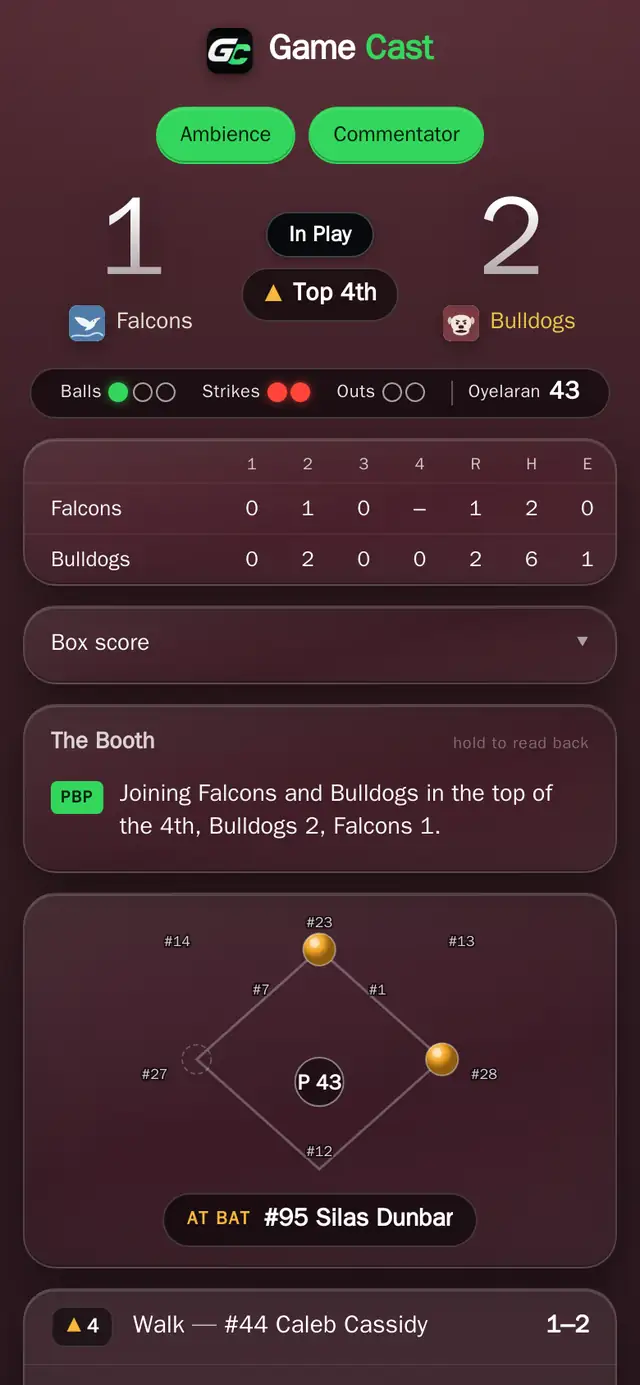
What a fan sees: the count, the ball in play, and the booth's line in writing.
A game that sounds like a ballgame
Play-by-play, colour, an umpire behind the plate and a crowd that reacts to what actually happened — built from the same events the scorekeeper is tapping, not a recording.
- Two voices: play-by-play and colour, with the crowd mixed underneath
- Names are spoken, including a respelling if the app gets one wrong
- Walk-up song and PA announcement per player, ten seconds at the plate
- Music between innings, one playlist per team
- Captions on the fan page, so it works with the sound off
- Every sound fades in and out. Nothing ever cuts
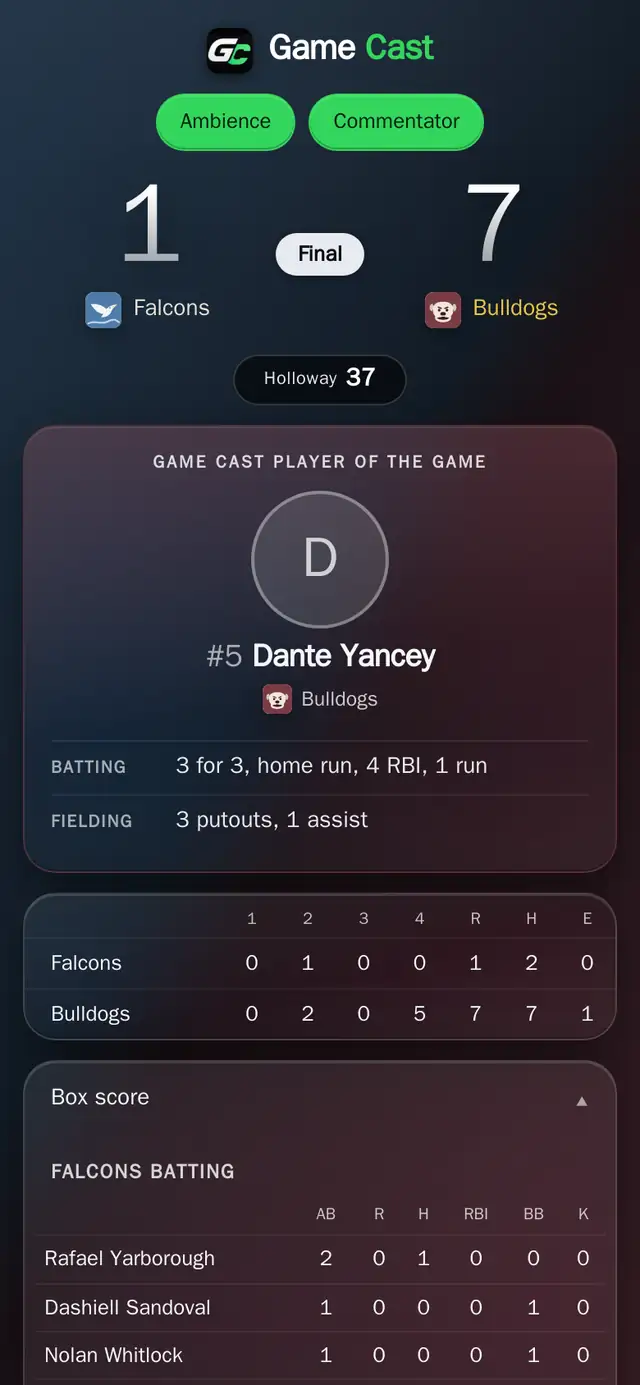
Player of the game, worked out from the batting, pitching and fielding lines.
Stats and clips that follow the kid
A player record is claimed by a parent and handed to the player at eighteen. It is not owned by a team, which means it survives changing clubs, changing sports seasons and ageing out.
- Season batting, pitching and fielding lines from real scored games
- Box score and line score for every game, printable
- Spray chart and scout report
- Player of the game, scored from the actual lines rather than picked by a coach
- Reels: a season cut down to the plays worth keeping
- Roster import from a spreadsheet, with duplicate detection and a contact email for every family
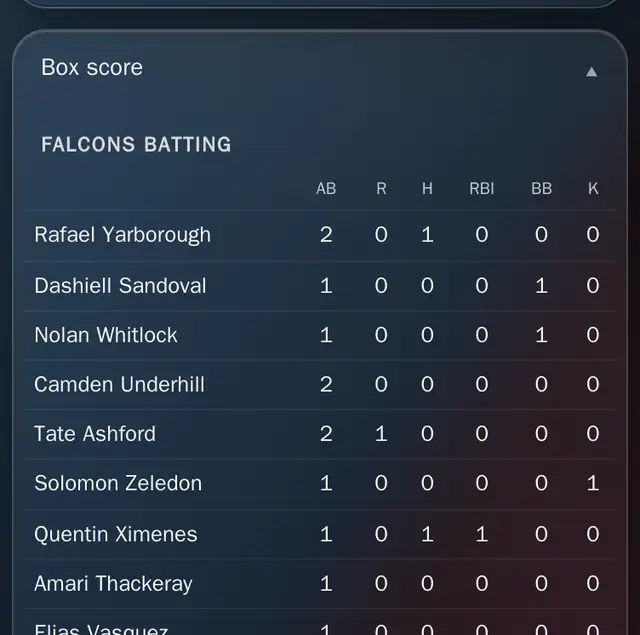
Every finished game leaves a box score behind, and the season adds itself up out of them.
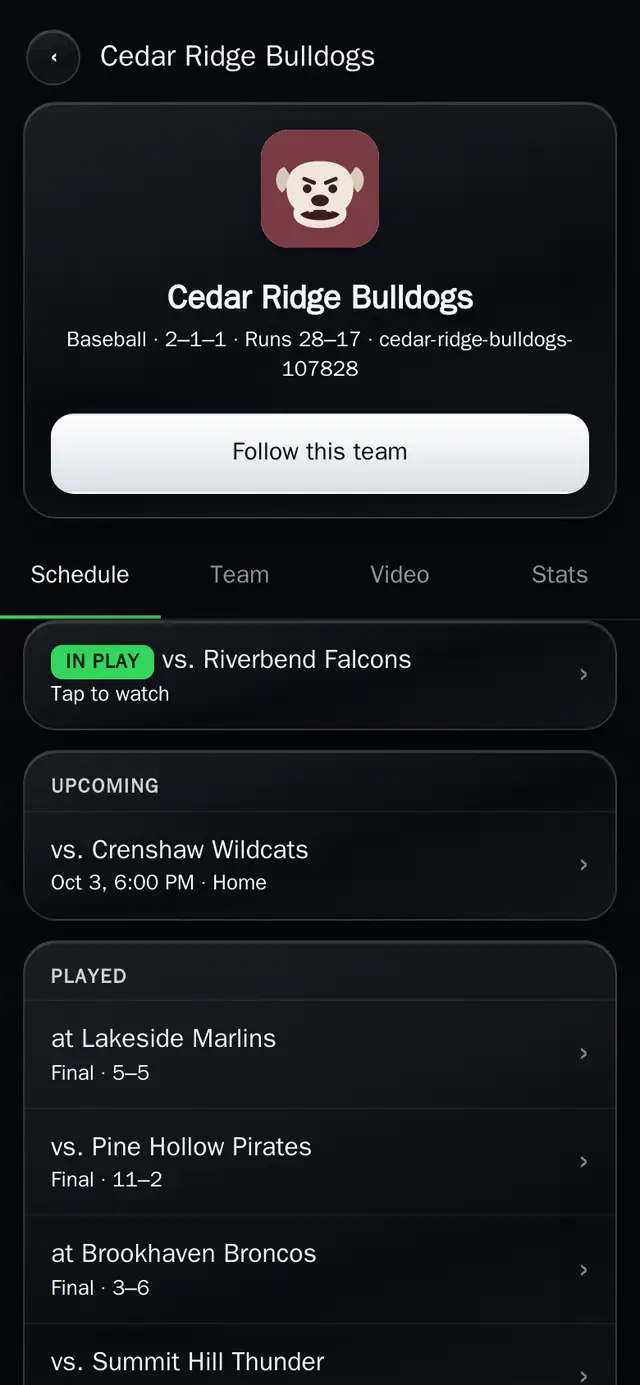
A team page: follow it, and every game it plays turns up on your phone.
For the people who are not at the field
Grandparents two states away, a parent stuck at work, the family that got there late. They all get the same game.
- Score alerts as a push notification, for the plays that involve your player
- RSVP, going or not, on every upcoming game
- Follow a team, or follow a player on any team you belong to
- Coaches invite families by email; the invited address is the approval, anyone else waits for the coach
- A parent picks their child on the roster, and the coach confirms it against the player's code
- A team page with four tabs — schedule, roster, video, stats — and the stats held back from anyone the coach has not let in
- A public link for a demo or a showcase game, when a coach wants one
Being built
this week
Everything above runs today. Everything below is being built now and is expected to be running in the coming days. Each one carries the amber chip until it does, and gets its picture the day it ships — a real capture, like the ones above, never a drawing.
The picture goes up the day it runs.
The whole season on one list, and who is coming to each of it.
Practices, games and who is coming
Every game, practice and team event on one schedule, put in for the whole season at once, and an answer from every family before the coach writes a lineup.
- Games, practices and everything else on one schedule, entered for the season in one sitting
- Arrival time separate from start time, the field, a note, and a repeat every week
- Subscribe from the phone's own calendar; a change lands there by itself
- RSVP on every event, players counted apart from family, and a parent answers for each child
- Reminders the coach turns on, sent only to the families who have not answered
- Who is coming, visible where the lineup is set
The picture goes up the day it runs.
Staff and parents in one place, with the pictures from Saturday.
The team thread, with pictures
One thread for the team, and the pictures and video that used to live in six group chats.
- One thread per team for staff and parents; fans and followers read what the coach posts
- Photos and video from the stands, shared to the team and nobody else
- Announcements from the coach to a chosen audience — parents, family and friends, followers, staff — with the flyer attached
- A note to the fans during a game, pinned to the live page
- A push for a message, a schedule change, and a game going live
The picture goes up the day it runs.
A full-resolution copy on the phone, whatever the signal is doing.
Record to the phone, score on the picture
For the field with no signal, and for the league with a sponsor.
- Stream and record to the phone: a full-resolution copy saved on the device when the signal will not carry the live picture, uploaded when it will
- The scoreboard on the picture itself — teams, score, inning and count — burned into the stream and the recording
- A sponsor's logo on the stream, for the league or club that has one
- A test stream before game day, and the viewer count on the streamer's screen
The picture goes up the day it runs.
One tap during the game, trimmed after, kept on the record.
Cut it yourself, keep it forever
The auto-cutter already clips every play. This adds the one you saw and wanted.
- Mark a clip by hand during a live game with one tap; it lands on the player's record beside the automatic ones
- Trim a clip, and download it to the phone to keep
- A game's highlights, cut to a few minutes the same night
- Sharing stays inside Game Cast: a clip of a child never gets a public link
The picture goes up the day it runs.
The game written up the same night, and what the coach can take from it.
A recap written from the book
The booth already calls the game live. Next it writes it up.
- A written recap of every game — headline and story — from the same events the scorer tapped
- Coach insights: quality at-bats, two-strike hits, where the runs came from and where they were let in
- Film review: the recording with the dead time cut out, the key moments marked, and notes shared with players and families
The picture goes up the day it runs.
Last season's roster becomes this season's, and the record keeps counting.
Roll the roster forward
A new season should take one tap, not a spreadsheet.
- A new season from last season's roster in one step; records, contacts and player codes carry over
- A career table on every player record: every season, every team, one line each
- Last season's games stay where they were, under last season
The picture goes up the day it runs.
The same scorebook, fitted for a clock and a floor.
Basketball is next
Baseball and softball today. The same engine is being fitted with sport packs, and basketball goes first because tryouts are in November.
- Basketball, then volleyball, then soccer, each with its own rules, clock and stats
- Softball is live now: its own choice when a team is made, sharing baseball's book, positions and stats
- Football, lacrosse, track and field, cross country and swimming to follow; a meet scores by places, not points
- Streaming, cameras, clips, alerts and Player of the Game on every sport from the first day it lands
- No sport is ever a paid tier
What is honestly
still coming
Everything above either runs today or is in build for the coming days. These are further out, and are listed so nobody buys on a promise.
Tournament billing
Invoice a team to enter, take the card, and see who has paid at a glance.
Gate ticketing
A digital pass per family, scanned at the gate, with the takings going to the organizer.
Team fees
Collect a season fee from parents on a schedule, and chase the ones that have not paid.
Tournament scheduling
Pools, brackets, fields and times, with the app telling every family where to be and what changed.
A native iPhone app
Game Cast installs from the web today. The App Store version is being built, and your account carries over.
Voice scoring
Built and switched off while we decide where it belongs.
Put your season on Game Cast
Free for every family, every team. Nothing to install from a store; it goes on the home screen in four taps.